
Firebug 1.8: console.timeStamp()
by Honza- Published:June 16th, 2011
- Comments:32 Comments
- Category:Firebug, HAR, NetExport, Planet Mozilla
Firebug 1.8b3 introduces a new API that can be used to create time-stamps during Javascript execution and compare them together with HTTP traffic timing on the timeline in the Net panel: console.timeStamp();
This feature is useful in cases where the developer needs to know when particular piece of Javascript code is executed relatively to the HTTP request made by web page. Especially in cases when Javascript is loaded through dynamically appended <script> tags or through XHR and evaluated using eval().
See the following screenshot that shows a time-stamp generated during a page load.
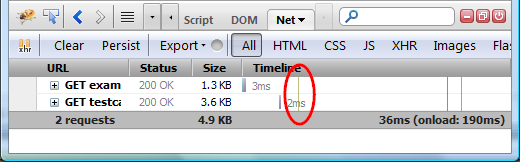
The time stamp is also displayed in the Console panel so, you can compare with other logs.
The rest of this post demonstrates this feature on couple of live examples in detail. So, if you are interested what you can do with Firebug 1.8, read further!
Script used in examples
Before we dive into details, let's define some basic functions used in the examples below.
{
var script = document.createElement("script");
script.src = url;
document.getElementsByTagName("head")[0].appendChild(script);
}
function sleep(ms)
{
var now = (new Date()).getTime();
while ((now + ms) > ((new Date()).getTime())){}
}
addExternalScriptThis function creates a<script>element and appends it into the document. The element asynchronously fetches the script from an external URL.sleepThis functions freezes the JS execution for specified amount of time [ms].
Example 1
The first example shows basic usage of console.timeStamp() method. The preview below is the Net panel content (exported using NetExport Firebug extension) when the example page is loaded:
Script on the page looks like as follows:
sleep(100);
The Net panel content (move mouse over the vertical lines to see detailed timing info.):
- Two HTTP requests displayed. One for page document (example.html) and one for attached CSS file (testcase.css).
- After the CSS file is loaded, script on the page is executed. This is depicted by the Script on the page executed time-stamp (lines produced by console.timeStamp use olive color).
- Javascript execution is frozen for 100 milliseconds.
- The page fires DOMContentLoad event.
- The page fires load event.
Example 2
This example demonstrates dynamically inserted <script> element.
Script on the page looks like as follows:
addExternalScript("example.js");
console.timeStamp("External script added");
sleep(100);
The example.js file:
sleep(100)";
- Three HTTP requests displayed. One for page document (example.html), one for attached CSS file (testcase.css) and one for dynamically inserted script element (example.js).
- Just like in the previous example, the first Script on the page executed time-stamp is generated when script on the page is executed.
- An external script is added, but it's loaded asynchronously so, we can see the External script added time-stamp immediately after Script on the page executed.
- The example.js file starts loading.
- The page fires DOMContentLoad event.
- The example.js file is loaded and its script evaluated. The result is new External script executed time-stamp.
- The external script freezes the page for 100 milliseconds.
- The page fires load event.
Timeline extent & request grouping
Let's see yet another example that explains how requests in the Net panel are grouped in order to preserve reasonable time-extent for the timeline.
In order to avoid endless extent for the waterfall diagram, the Net panel is grouping requests that belongs together (starting a new group if there is a pause in HTTP traffic). Where each group's waterfall starts again from the beginning of the graph. See also this post.
Created time stamps and page events lines are always rendered across request entries in the last group.
See this Net panel log (one group):
- There is a time stamp generated long time after the page load event. The timeline extent has been extended to display the time stamp.
- Both requests have been done in the same time period and so they belong to the same group.
See another Net panel log (two groups):
- Two requests executed to load the page (just like in the previous example). Both belong to the same group.
- There are another three requests fired some time later. These form a new group.
- There is a time stamp, rendered across requests in the last group.
Addendum
HTTP traffic timing data displayed in the Net panel comes from Firefox network layer (Necko). Unfortunately, the network layer uses different timer than Javascript Date object and these timers can provide a bit different results. Since the console.timeStamp() method is based on the JS Date object, you could notice sometimes that time-stamps is delayed about ~10-30 ms. This should be fixed as soon as bug 570341 in Firefox is fixed.


32 Comments
[...] out the new console.timeStamp feature that’s coming in [...]
This is awesome! I was thinking of hacking something together for GTmetrix to do something like this, but this will save me from doing it myself 🙂
btw, we've written an addon to HAR Viewer - HAR Diff:
http://gtmetrix.com/changes.html
Will have to get things cleaned up enough to get you a patch (already sent you all the supplementary patches).
[...] detailed description of this feature + [...]
@Adrian Yee: great, I am happy to see that console.timeStamp() is useful already. Great job with HAR Diff! Please let me know as soon as it's open source, I'll take a look at it.
[...] Firebug nun endlich beim erfassen von Zeiten hilft ist eine grossartige Sache. Mehr dazu gibt es hier. This entry was posted in Firebug and tagged debugging, feature, Firebug, kurz gebloggt. [...]
Honza, I just wanted to note, that the red 'load' line and the new olive time stamp lines are not clearly distinguishable. This is due to their color and because they appear at the same horizontal offset. See your last example.
Besides that it's a great feature!
@Sebastian Z.: I am happy to change the color, I just couldn't find better (note that green is taken by paint events).
[...] Firebug nun endlich beim erfassen von Zeiten hilft ist eine grossartige Sache. Mehr dazu gibt es hier. Dieser Beitrag wurde unter Allgemein veröffentlicht. Setze ein Lesezeichen auf den Permalink. [...]
[...] Firebug nun endlich beim erfassen von Zeiten hilft ist eine grossartige Sache. Mehr dazu gibt es hier. Dieser Beitrag wurde unter Ajax, Allgemein abgelegt und mit AJAX, Debug, Firebug [...]
is it also possible to use the API from Firebug plugins or other Firefox Addons?
Would be great to have some kind of support for timestamps on the serverside, e.g. use firephp to log a timestamp while rendering a page and afterwards see those timestamps inside the timeline...?
@Markus: yes, it should be possible to use the API from other extensions. As far as the server-side-timing info is concerned, I would love to have it! There is a bug reported for this: http://code.google.com/p/fbug/issues/detail?id=3613
we can discuss it further under that report.
[...] console.timeStamp() [...]
[...] detailed description of this feature with examples how to use [...]
[...] detailed description of this feature with examples how to use [...]
[...] console.timeStamp() [...]
[...] and remote debugging. Another powerful feature arrived with this version is console.timeStamp() API. The new project leader of Firebug, Jan Odvarko Honza, explains this as: “This feature is useful [...]
[...] Более подробное описание с примерами (англ.). [...]
[...] czasoznaczki w JavaScripcie – nowe API pozwala na wstawianie do JavaScriptu czasoznaczków i porównywanie ich na linii czasu z ruchem HTTP w panelu Net. Stosujemy do tego metodę console.timeStamp();. Szczegółowy poradnik, jak to wykorzystać, znajdziecie tutaj, [...]
[...] loaded by appending <script> nodes or using XMLHttpRequest methods.For more information, see Firebug 1.8: console.timeStamp().IP Address in the Net PanelSticking with the Net Panel, you can now view local and remote IP [...]
What’s New in Firebug 1.8...
If it weren’t for Firebug, Firefox would not necessarily be the most popular web development browser. That said, without Firebug, we wouldn’t have great developer tools such as the webkit Inspector, Opera Dragonfly or IE’s Developer Tools....
[...] For more information, see Firebug 1.8: console.timeStamp(). [...]
[...] For more information, see Firebug 1.8: console.timeStamp(). [...]
[...] For more information, see Firebug 1.8: console.timeStamp(). [...]
[...] detailed description of this feature with examples how to use [...]
[...] Более подробное описание с примерами (англ.). [...]
[...] 英文原版:http://www.softwareishard.com/blog/firebug/firebug-1-8-console-timestamp/ Tags:Firefox,性能 分享到:腾讯微博QQ空间新浪微博人人网开心网豆瓣FacebookTwitter [...]
[...] 英文原版:http://www.softwareishard.com/blog/firebug/firebug-1-8-console-timestamp/ [...]
[...] of the features and examples please click on the details [...]
[...] O Reilly Media, Inc.Language: EnglishISBN-10: 3613006111ISBN-13: 178-4852006223Paperback: 537 pagesA detailed description of the product. Lorem ipsum dolor sit amet, consetetur sadipscing elitr, sed ...est Lorem ipsum dolor sit amet.SpecificationsPublisher: O Reilly Media, Inc.Language: [...]
[...] Most households spend thousands each year on expensive electricity-bills - most of them don't even know that Portable Solar Energy Source can easily save them up to amazing 80% on that irritating expense. It is almost unbelievable that this technique requires no more than a weekend to get it done. If you read this article you'll be able to learn more about how this technology can help you to significantly cut your expenses. Some background As you probably already imagine, in order to have such Portable Solar Energy Source you'll need to have one of these unique Web-guides that'll expose simple methods on how to assemble Solar Panels with your own hands. Although many of these guides offer the same thing, it is necessary to choose the right one; make sure it provides detailed descriptions, diagrams, and support so you'll never get lost. In any case, here are some important benefits and tips that can help you to know a little more about this topic. Advantages Finally, when looking for the bottom-line, we easily identify the following benefits: * Increases the value of your home by thousands.* It is portable and you can take it with you (camping for example).* Extremely easy to be implemented by almost anyone.* Enables us to store the produced elect.-power at zero cost.* Powers up basically any appliance at home: fridge, washing machine, computer, TVs, lights and more.Tip Nowadays it is possible to get deep cycle batteries at no cost, so you can store your energy for free.Conclusions Using this cost-effective Portable Solar Energy Source is quite enjoyable and it requires no special technical/professional skills on the user's side. If we go a little further, it wouldn't be that hard to discover other advantages provided by this unique 'machine', simply because it brings a real change to this industry. The first action you need to take is to watch it in action as in most cases it will take you no more than a single weekend to have it working. Jason Gilfordhttp://www.articlesbase.com/diy-articles/portable-solar-energy-source--it-works-period-721917.html Most households spend thousands each year on expensive electricity-bills - most of them don't even ...most of them don't even know that Portable Solar Energy Source can easily save them up to amazing 80% on that irritating expense. It is almost unbelievable that this technique requires no more than a weekend to get it done. If you read this article you'll be able to learn more about how this technology can help you to significantly cut your expenses. Some background As you probably already imagine, in order to have such Portable Solar Energy Source you'll need to have one of these unique Web-guides that'll expose simple methods on how to assemble Solar Panels with your own hands. Although many of these guides offer the same thing, it is necessary to choose the right one; make sure it provides detailed descriptions, diagrams, and support so you'll never get lost. In any case, here are some important benefits and tips that can help you to know a little more about this topic. Advantages Finally, when looking for the bottom-line, we easily identify the following benefits: * Increases the value of your home by thousands.* It is portable and you can take it with you (camping for example).* Extremely easy to be implemented by almost anyone.* Enables us to store the produced elect.-power at zero cost.* Powers up basically any appliance at home: fridge, washing machine, computer, TVs, lights and more.Tip Nowadays it is possible to get deep cycle batteries at no cost, so you can store your energy for free.Conclusions Using this cost-effective Portable Solar Energy Source is quite enjoyable and it requires no special technical/professional skills on the user's side. If we go a little further, it wouldn't be that hard to discover other advantages provided by this unique 'machine', simply because it brings a real change to this industry. The first action you need to take is to watch it in action as in most cases it will take you no more than a single weekend to have it working. Jason Gilfordhttp://www.articlesbase.com/diy-articles/portable-solar-energy-source--it-works-period-721917.html WordPress › Error [...]
[...] Want to say goodbye to these high electric-bills? Well, "Installing Solar Power Kits" System provides an amazing opportunity for you to finally take action and fulfill that wish. It may be surprising, but this technique takes no more than just few days to be completed. Follow this report in order to discover more and understand how it can help you. Quick introduction How can anyone have such "Installing Solar Power Kits" System? Well, it is about using one of these easy-to-understand guides that provide the information on how to assemble Solar-Panels. Before choosing a guide verify that it answers your needs; make sure it provides detailed descriptions, diagrams, and support so you'll never get lost. In any case, here are some important benefits and tips that can help you out. Important advantages We could clearly notice several good reasons to use this one-of-a-kind solution: * It is already proven to work for thousands of people.* Excellent backup to your conventional elec. sys. in case of power failure.* No need to remember to switch off the lights each time we leave the room.* Enables us to get an extra income by quickly providing such sys. for others.* Enables us to store the produced elect.-power at zero cost.Tip Pulling yourself "off the grid" all at once isn't recommended - do it gradually and slowly, use your new sys. while keeping the 'Main-Grid' as backup for possible extreme electricity usage.On the bottom line These exciting solutions not only save us thousands each year - this advanced "Installing Solar Power Kits" System even creates an extra source of income. We could probably come across other benefits provided by this exceptional invention, simply because more people are becoming aware of the opportunities that it provides. Now is the time to take action - it is recommended to evaluate it so you could truly see how it can save your monthly budget. Jason Gilfordhttp://www.articlesbase.com/diy-articles/quotinstalling-solar-power-kitsquot-system--act-now-701013.html Want to say goodbye to these high electric-bills? Well, "Installing Solar Power Kits" System provid...p://www.easyfreeenergy.com/?cd=S4G118&hl=Installing+Solar+Power+Kits+system">"Installing Solar Power Kits" System provides an amazing opportunity for you to finally take action and fulfill that wish. It may be surprising, but this technique takes no more than just few days to be completed. Follow this report in order to discover more and understand how it can help you. Quick introduction How can anyone have such "Installing Solar Power Kits" System? Well, it is about using one of these easy-to-understand guides that provide the information on how to assemble Solar-Panels. Before choosing a guide verify that it answers your needs; make sure it provides detailed descriptions, diagrams, and support so you'll never get lost. In any case, here are some important benefits and tips that can help you out. Important advantages We could clearly notice several good reasons to use this one-of-a-kind solution: * It is already proven to work for thousands of people.* Excellent backup to your conventional elec. sys. in case of power failure.* No need to remember to switch off the lights each time we leave the room.* Enables us to get an extra income by quickly providing such sys. for others.* Enables us to store the produced elect.-power at zero cost.Tip Pulling yourself "off the grid" all at once isn't recommended - do it gradually and slowly, use your new sys. while keeping the 'Main-Grid' as backup for possible extreme electricity usage.On the bottom line These exciting solutions not only save us thousands each year - this advanced "Installing Solar Power Kits" System even creates an extra source of income. We could probably come across other benefits provided by this exceptional invention, simply because more people are becoming aware of the opportunities that it provides. Now is the time to take action - it is recommended to evaluate it so you could truly see how it can save your monthly budget. Jason Gilfordhttp://www.articlesbase.com/diy-articles/quotinstalling-solar-power-kitsquot-system--act-now-701013.html WordPress › Error [...]
[...] Software is hard Begin document.oncontextmenu = function(){return false} // End /**/ // Begin document.ondragstart = function(){return false} var zoomImagesBase = '/wp-content/plugins/wp-fancyzoom/'; addDOMLoadEvent(setupZoom); // ajaxurl = 'http://thebest-computers.com/wp-admin/admin-ajax.php'; loading_img_url = 'http://thebest-computers.com/wp-admin/images/loading.gif'; // (function(d, s, id) { var js, fjs = d.getElementsByTagName(s)[0]; if (d.getElementById(id)) {return;} js = d.createElement(s); js.id = id; js.src = "//connect.facebook.net/id_ID/all.js#xfbml=1"; fjs.parentNode.insertBefore(js, fjs); }(document, 'script', 'facebook-jssdk')); Computers Tips and Trick Give Information for You.HomeGadgetLaptopComputerSoftwareAplicationNetbookAbout My SitePrivacy PolicyContactSitemapLink ExchangeSpeakers For TvUltrabook Notebook Tipis Harga Murah TerbaikSepeda Motor Injeksi Irit Harga Terbaik Cuma Honda About Me September 8th, 2011 | Author: Reza Firmansyah HOT PRODUCT 2012 .its Here!!! [...]