Firebug 2 (released today!) uses number of internal architectural concepts that help to implement new features as well as effectively maintain the code base.
Using transparent architecture and well known design patterns has always been one of the key strategies of the (relatively small) Firebug team that allows us maintain rather large set of features in Firebug.
This post describes the way how Firebug deals with JavaScript object representation and the concept ensuring that an object is always rendered the same way across entire Firebug UI.
- Firebug 2.0 is compatible with Firefox 30 - 32
See also list of new features in Firebug 2
Firebug Internals I.
Read more...
One of the achievements of Firebug 2 alpha 1 release has been adoption of new JSD2 API and this task required significant changes and improvements in our code base. Among other things, we have also introduced a new concept that allows to nicely build asynchronously updated UI.
There are other concepts in Firebug 2 and this version is with no doubt the best one we have released. Try it and let us know how it works for you (Firefox 30+ needed).
In order to implement remote access to the server side debugger API, Firebug UI needs to know how to deal with asynchronous update. We applied Viewer Provider pattern and extended it with support for asynchronous data processing.
If you like using Document View, Model View Controller or similar design patterns to build your code base, you'll probably like Viewer Provider too.
So, follow this post if you are interested to know what Viewer Provider looks like.
Read more...
I couldn't miss this nifty extension in my series of posts about Firebug extensions. It's a small plugin focused on one thing and working great!
This extension is compatible with Firebug 1.12 (will be released in couple of weeks).
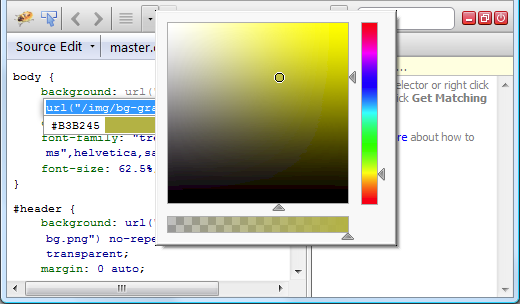
FirePicker adds a small color picker dialog when editing a CSS rule in Firebug. The addon scans for values that can be parsed as CSS colors and displays them in a drop-down list right below the firebug's CSS editor box. Clicking on the color value in the drop-down brings up a color picker dialog.
Read more...
Another Firebug extension we have tested with upcoming Firebug 1.12 (will be available in several weeks) allows managing web storage directly in your Firebug.
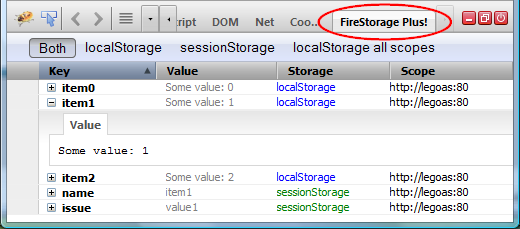
FireStorage Plus! appends an extra Firebug tab which lets you inspect and modify the local and session storage.
Read more...
FireQuery is one of my favorite extensions for Firebug and I am regularly using it every time I am debugging web application that is build on top of jQuery.
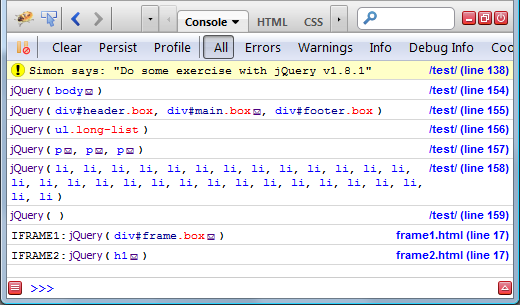
FireQuery is a Firebug extension for jQuery development. It's a collection of Firebug enhancements for jQuery.
Read more...
Another nice extension I would like to mention is related to server side logging: FireLogger
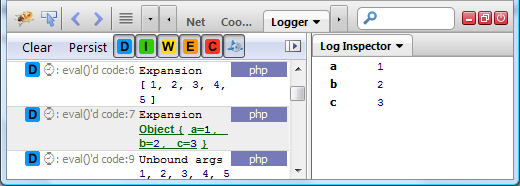
FireLogger implements simple yet powerful server side logging (similar to console.log on the client side). It creates a new panel (a logging console) in Firebug UI that displays logs coming from the server.
Logs are sent to the client side over HTTP headers. The extension supports PHP and Python scripts.
You can dowload it from AMO.
Read more...
There are many Firebug extensions implementing new nifty features for Firebug and its great to see that new ones are still coming.
In this post, we'll take a quick look at one of them: Console Export.
ConsoleExport is a Firebug extension (you need Firebug 1.6+) that allows exporting logs from the Console panel. The export can be done manually through an Export button (see the screenshot below) or automatically by sending every log to the server.
Read more...
Firebug 1.12 alpha 6 introduces one new feature called simply: Use in Command Line
This feature allows referring various page objects (HTML elements, JS objects, network requests, cookies, etc.) from within Firebug Command Line.
The user can also use object's properties in JS expressions.
See issue 6422 for more details.
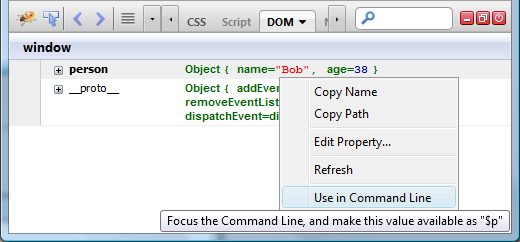
This post explains the feature in detail and also asks for feedback.
Read more...
One of the new features introduced in Firebug 1.12 alpha 5 is a filter for DOM event logs (issue 229).
Logging of DOM events has been available in Firebug for a long time and the filter should make it more useful and effective in daily usage.
The problem is that we are unsure whether UI/UX of the filter is implemented properly.
So, if you are using this handy feature please read further and let us know what you think (leave a comment below).
Read more...
I had an opportunity to be a reviewer of a new book about Firebug written by Chandan Luthra. This is actually the second book dedicated to Firebug and so, you might also be interested in the first one.
The book is labeled Instant Firebug Starter
Monitor, edit, and debug any web page in real time with this handy practical guide.
Read more...


